learn-claude-code/s02_tool_use at main · shareAI-lab/learn-claude-code
前文需要完成一个文件读写,通过bash工具
需要让模型自己思考:
- 是否使用
cat指令 cat哪一个文件- ……
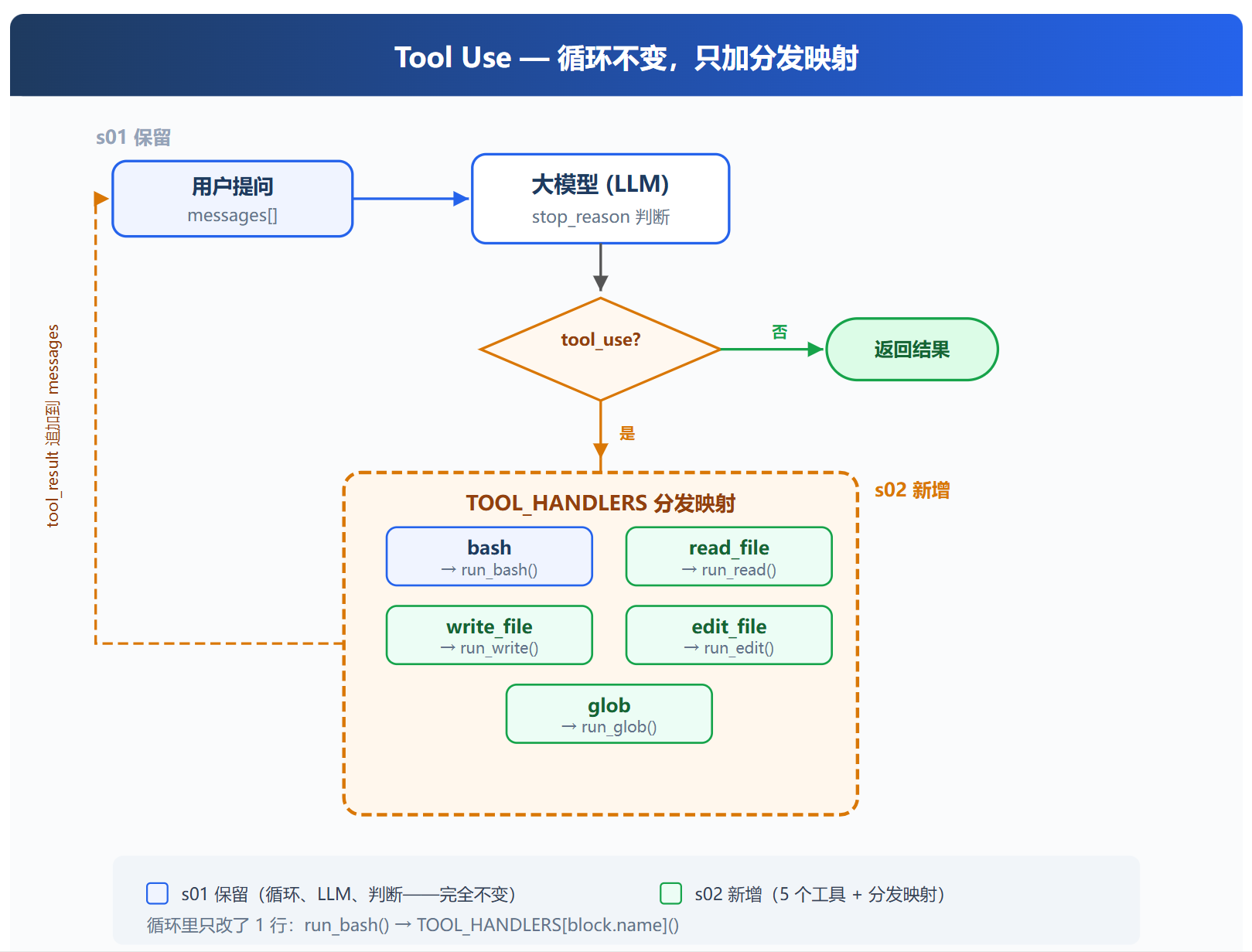
因此对于常用的功能,我们最好通过系统层面的封装
避免token的消耗,同时也能够减少出错概率
我们可以引入一个TOOL_HANDLERS,作为字典映射到每一个工具的具体代码
  1#!/usr/bin/env python3
  2
  3from dotenv import load_dotenv
  4from anthropic import Anthropic
  5import os, subprocess
  6from pathlib import Path
  7
  8load_dotenv(override=True)
  9
 10client = Anthropic(
 11    base_url=os.getenv("ANTHROPIC_BASE_URL"),
 12    api_key=os.getenv("ANTHROPIC_API_KEY"),
 13)
 14
 15MODEL = os.getenv("MODEL_ID", "claude-3-5-sonnet-latest")
 16
 17TOOLS = [
 18    {
 19        "name": "bash",
 20        "description": "Run a shell command.",
 21        "input_schema": {
 22            "type": "object",
 23            "properties": {
 24                "command": {"type": "string"}
 25            },
 26            "required": ["command"],
 27        },
 28    },
 29    {
 30        "name": "read_file",
 31        "description": "Read the content of a file.",
 32        "input_schema": {
 33            "type": "object",
 34            "properties": {
 35                "path": {"type": "string"},
 36                "limit": {"type": "integer"} # 可选参数,限制读取的字节数,默认读取整个文件
 37            },
 38            "required": ["path"],
 39        },
 40    },
 41    {
 42        "name": "write_file",
 43        "description": "Write content to a file.",
 44        "input_schema": {
 45            "type": "object",
 46            "properties": {
 47                "path": {"type": "string"},
 48                "content": {"type": "string"}
 49            },
 50            "required": ["path", "content"],
 51        },
 52    },
 53    {
 54        "name": "edit_file",
 55        "description": "Replace exact text in a file once.",
 56        "input_schema": {
 57            "type": "object",
 58            "properties": {
 59                "path": {"type": "string"},
 60                "old_text": {"type": "string"},
 61                "new_text": {"type": "string"}
 62            },
 63            "required": ["path", "old_text", "new_text"],
 64        },
 65    },
 66    {
 67        "name": "glob",
 68        "description": "Find files matching a glob pattern.",
 69        "input_schema": {
 70            "type": "object",
 71            "properties": {
 72                "pattern": {"type": "string"}
 73            },
 74            "required": ["pattern"],
 75        }
 76    }
 77]
 78
 79WORKDIR = Path.cwd()
 80# ── Tool execution ────────────────────────────────────────
 81def run_bash(command: str) -> str:
 82    dangerous = ["rm -rf /", "sudo", "shutdown", "reboot", "> /dev/"]
 83    if any(d in command for d in dangerous):
 84        return "Error: Dangerous command blocked"
 85    try:
 86        r = subprocess.run(command, shell=True, cwd=WORKDIR,
 87                           capture_output=True, text=True,
 88                           encoding="utf-8", errors="replace", timeout=120)
 89        out = (r.stdout + r.stderr).strip()
 90        return out[:50000] if out else "(no output)"
 91    except subprocess.TimeoutExpired:
 92        return "Error: Timeout (120s)"
 93    except (FileNotFoundError, OSError) as e:
 94        return f"Error: {e}"
 95
 96# 路径安全限制:确保路径必须在WORKDIR之内,不能逃逸
 97def safe_path(p: str) -> Path:
 98    path = (WORKDIR / p).resolve() # 绝对路径
 99    if not path.is_relative_to(WORKDIR):
100        raise ValueError(f"Path escapes workspace: {p}")
101    return path
102
103
104def run_read(path: str, limit: int | None = None) -> str:
105    try:
106        lines = safe_path(path).read_text().splitlines()
107        if limit and limit < len(lines):
108            lines = lines[:limit] + [f"... ({len(lines) - limit} more lines)"]
109        return "\n".join(lines)
110    except Exception as e:
111        return f"Error: {e}"
112
113def run_write(path: str, content: str) -> str:
114    try:
115        path = safe_path(path)
116        path.parent.mkdir(parents=True, exist_ok=True)
117        path.write_text(content)
118        return f"Wrote {len(content)} bytes to {path}"
119    except Exception as e:
120        return f"Error: {e}"
121
122def run_edit(path: str, old_text: str, new_text: str) -> str:
123    try:
124        path = safe_path(path)
125        text = path.read_text()
126        if old_text not in text:
127            return f"Error: text not found in {path}"
128        path.write_text(text.replace(old_text, new_text, 1))
129        return f"Edited {path}"
130    except Exception as e:
131        return f"Error: {e}"
132
133
134def run_glob(pattern: str) -> str:
135    import glob as g
136    try:
137        results = []
138        for match in g.glob(pattern, root_dir=WORKDIR):
139            if (WORKDIR / match).resolve().is_relative_to(WORKDIR):
140                results.append(match)
141        return "\n".join(results) if results else "(no matches)"
142    except Exception as e:
143        return f"Error: {e}"
144
145
146
147TOOL_HANDLERS = {
148    "bash": run_bash,
149    "read_file": run_read,
150    "write_file": run_write,
151    "edit_file": run_edit,
152    "glob": run_glob
153}
154
155
156SYSTEM = f"You are a coding agent at {os.getcwd()}. Use bash to solve tasks. Act, don't explain."
157
158
159
160def agent_loop(history):
161    while True:
162
163        response = client.messages.create(
164            model=MODEL,
165            max_tokens=1024,
166            messages=history,
167            tools=TOOLS,
168            system=SYSTEM,
169        )
170
171        # 保存模型记录
172        history.append({"role": "assistant", "content": response.content})
173        print(f"Model response: {response.content}")
174        # 如果不再需要工具调用
175        if response.stop_reason != "tool_use":
176            return
177
178        tool_results = []
179        for block in response.content:
180            if block.type == 'tool_use':
181                print(f"Tool call: {block.name} with input {block.input}")
182                handler = TOOL_HANDLERS[block.name] # 转化对应函数
183                output = handler(**block.input) if handler else f"Unknow: {block.name}"
184                print(str(output)[:200])
185                tool_results.append({
186                    "type": "tool_result",
187                    "tool_use_id": block.id, # 对应同block的工具调用id
188                    "content": output
189                })
190
191        # 将工具调用结果添加到历史记录中,供模型后续生成使用
192        history.append({"role": "user", "content": tool_results})
193
194
195
196
197if __name__ == "__main__":
198
199    history = []
200
201    # 这里是多轮对话的循环
202    while True:
203        query = input("Enter your query: ")
204
205        if query.lower() in ["exit", "quit"]:
206            print("Exiting the agent loop.")
207            break
208
209        history.append({"role": "user", "content": query})
210        agent_loop(history) # Agent内部循环,完成工具调用和响应生成
211
212        final_output = history[-1]["content"]
213        print(final_output)
214
215    print("Goodbye!")
当任务比较复杂的时候,模型会一次性输出多个toolblock
如果模型足够强,这当然是并发的,因此可以获取所有toolblock去做
1Read both README.md and requirements.txt, then create a summary file
这里会先两个tool块获取两个文件信息
然后思考一下,第二次循环做写的工具调用
Claude Code
定义
工具的定义上我们是定义与实现分开的
但实际上CC会对每个工具通过buildTool()实例化一个对象
包含 schema、验证、权限、执行
Validation
工具调用前需要经过严格的五步验证
- Zod Schema(类似json schema):参数类型、结构检查
- 工具级别的参数验证:确保参数符合工具输入要求
- PreToolUse hooks:工具执行前设计一些hooks进行工作
- 权限:是否涉及了不允许的内容
- 执行
isConcurrencySafe()
代码中还是串行的,CC实际上是按照batch做并行
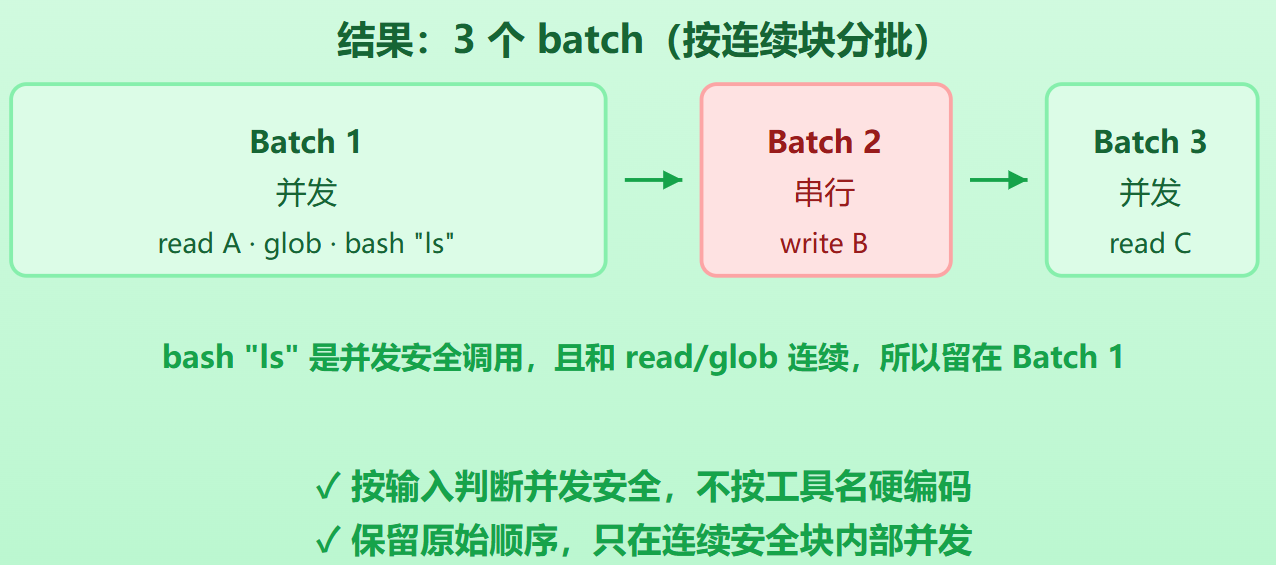
有专门的方法isConcurrencySafe()检验一个工具调用是否是并发安全的
并发安全和只读是不一样的。有的方法是非只读的,但是由于操作不同文件,因此两者之间是并发安全的
1[read A, read B, glob *.py, bash "rm x", read C]
2  → batch1(并发): [read A, read B, glob *.py]
3  → batch2(串行): [bash "rm x"]
4  → batch3(并发): [read C]
并发安全的连续块编入同一个 batch
batch 内真正并发执行(有并发上限)
遇到非并发安全就开新batch
batch之间串行
Result持久化
当一个工具的输出足够长时,为了节省token
设计了一个maxResultSizeChars
如果超过上限,自动截断,将完整内容保存到文件中
只提供给模型上限内的文本 + 完整内容的文件路径
对于Read操作,为了防止重复创建文件
这个上限直接设置成无限即可